


Table of Contents
What Are Network Monitoring Tools?
Network monitoring tools are software solutions to oversee, analyze, and manage the performance and health of a network. These tools continuously monitor various network components, such as routers, switches, servers, and applications, to ensure they are functioning correctly.
By tracking metrics like traffic, latency, and uptime, they help IT teams identify and address issues before they escalate into significant problems. The primary goal of network monitoring tools is to maintain the availability, reliability, and security of a network. They provide visibility into network activity, enabling organizations to detect inefficiencies, outages, or security threats.
Additionally, these tools support capacity planning, performance optimization, and compliance with service-level agreements (SLAs). Modern network monitoring tools often integrate features like real-time analytics, AI-driven insights, and support for cloud infrastructure.
This is part of a series of articles about network security
Editor’s note: Updated the article to cover recent market trends, updated information for network monitoring tools to reflect features and capabilities in 2026, and added two new tools.
Network Monitoring Market Trends
According to recent market research, the global network monitoring market is projected to grow from USD 3.13 billion to USD 5.23 billion by 2031, reflecting a compound annual growth rate (CAGR) of 8.89% from 2026 to 2031.
Growth is driven by zero-trust mandates, the expansion of 5G and IoT, and the shift to hybrid-cloud environments that require broader and more distributed visibility. These factors are turning network monitoring from an operational tool into a strategic requirement.
Key Growth Drivers
Several structural trends are accelerating market expansion. The shift to hybrid work and multi-cloud environments has increased the need for distributed telemetry across data centers, cloud platforms, and remote endpoints. Many organizations still lack full-stack visibility, creating demand for modern observability platforms.
The rapid expansion of 5G and IoT is also increasing traffic volume and complexity. Industrial IoT and network slicing require granular, near real-time monitoring to maintain service levels. At the same time, cybersecurity and zero-trust compliance mandates, especially in North America and Europe, are making continuous network telemetry a regulatory requirement rather than an option.
AI-driven observability and eBPF-based deep visibility are emerging as competitive differentiators. Vendors are integrating anomaly detection and machine learning to reduce resolution times and manage growing telemetry volumes.
Component Trends: Equipment Versus Services
In 2025, monitoring equipment accounted for 44.66% of total revenue. This includes packet brokers and optical taps used in high-speed data centers. However, services are expanding faster, with a projected CAGR of 10.54% through 2031.
Managed services are gaining traction due to persistent skills shortages in NetOps and SecOps. Many organizations, especially SMEs, prefer monitoring-as-a-service to avoid building in-house expertise. As complexity rises, service-based models are expected to capture a larger share of new spending.
Deployment Models: Shift Toward Hybrid
On-premise deployments held 57.96% of the market in 2025, largely due to data sovereignty and regulatory requirements such as GDPR and similar laws in Asia. Sensitive telemetry often must remain within national borders.
However, hybrid deployments are growing at a faster rate, with an expected CAGR of 11.54% through 2031. Many organizations now store raw data locally while sending enriched metadata to cloud-based analytics engines. This model balances compliance with scalability and cost efficiency.
Essential Features of Network Monitoring Tools
A network monitoring solution should include the following capabilities.
Real-Time Performance Monitoring
Real-time performance monitoring involves tracking and analyzing data as it flows through the network, offering instant feedback on traffic, connectivity, and server load. This quick access to performance metrics enables IT teams to identify and resolve issues promptly.
With real-time monitoring, organizations can maintain optimal network performance and reduce downtime. By continuously observing network activities, IT teams can anticipate problems before they affect user experience.
Availability Monitoring
Availability monitoring focuses on ensuring that all network components are operational and accessible. It checks the uptime and health of servers, applications, and network devices, promptly alerting IT staff to any accessibility issues. This feature is vital for maintaining continuous service availability, supporting critical business processes, and upholding SLAs.
By implementing availability monitoring, organizations can reduce the risk of unexpected downtime. Continuous tracking allows for swift issue resolution, ensuring that network disruptions have minimal impact.
Traffic and Bandwidth Analysis
Traffic and bandwidth analysis provides insights into how network resources are used and identifies patterns that might indicate inefficiencies or threats. Network monitoring tools use data collection techniques to analyze traffic flow, bandwidth usage, and packet transfer rates. This analysis helps in understanding network load and congestion points, enabling administrators to optimize performance.
Efficient traffic and bandwidth analysis helps balance network resources and prevent overutilization, ensuring that critical applications receive the necessary bandwidth. By identifying traffic sources and understanding usage patterns, IT teams can make informed decisions about capacity planning and network upgrades.
Security Monitoring
Security monitoring is a vital feature that focuses on identifying and mitigating potential threats and vulnerabilities within a network. It involves tracking suspicious activities, unauthorized access attempts, and unusual data flows. Network monitoring tools use techniques like intrusion detection and behavior analysis to improve network security.
Implementing security monitoring ensures that threats are detected and addressed swiftly. This proactive stance is essential in protecting sensitive data and maintaining compliance with regulatory standards. Continuous security monitoring provides insights that help refine security policies and improve the overall security posture of the organization.
Cloud Infrastructure Monitoring
Cloud infrastructure monitoring involves observing and analyzing the performance and health of cloud services and resources. This feature is increasingly important as organizations migrate to cloud-based environments. It ensures that cloud services meet performance expectations, maintaining the reliability and availability of applications hosted in the cloud.
Effective cloud monitoring helps in optimizing cloud resource utilization and managing costs. By tracking service health, latency, and user interactions, IT teams can swiftly address issues and maintain service levels.
Customizable Metrics and Dashboards
Customizable metrics and dashboards allow organizations to tailor network monitoring to their needs and objectives. Users can select relevant performance indicators and design dashboards that display critical information in an accessible format.
Tailored dashboards and metrics allow IT teams to quickly access and interpret network data, enabling faster decision-making. By customizing their monitoring environment, organizations can align monitoring efforts with business goals and operational priorities.
Related content: Read our guide to threat hunting
Tips from the expert

Steve Moore is Vice President and Chief Security Strategist at Exabeam, helping drive solutions for threat detection and advising customers on security programs and breach response. He is the host of the “The New CISO Podcast,” a Forbes Tech Council member, and Co-founder of TEN18 at Exabeam.
In my experience, here are tips that can help you choose, deploy, and maximize the value of network monitoring tools:
- Prioritize hybrid and multi-cloud compatibility: As hybrid and multi-cloud environments become the norm, select monitoring tools that offer seamless integration with public cloud providers (e.g., AWS, Azure, Google Cloud) and private cloud infrastructure. This ensures visibility across diverse network layers.
- Implement a phased deployment approach: Avoid deploying monitoring tools across the entire network at once. Instead, roll out the solution in stages—starting with critical infrastructure—to minimize disruptions and fine-tune configurations while scaling.
- Integrate with SIEM and SOAR platforms: Connect monitoring tools with SIEM or SOAR solutions to centralize data analysis, enhance threat detection, and enable automated incident response workflows. This integration helps create a unified security ecosystem.
- Use AI-driven anomaly detection: Leverage tools that include AI and machine learning to identify subtle deviations from normal network behavior. This approach reduces reliance on static thresholds and improves the detection of zero-day threats or slow-burn attacks.
- Establish a baseline performance profile: Conduct a comprehensive baseline study of network performance metrics (e.g., latency, bandwidth, and throughput) during normal operations. This will help quickly identify anomalies and assess future performance improvements.
Notable Network Monitoring Tools
Security-Focused Network Monitoring and SIEM Tools
1. Exabeam

Exabeam is a leading provider of security information and event management (SIEM) solutions, combining UEBA, SIEM, SOAR, and TDIR to accelerate security operations. Exabeam Security Operations platform enables security teams to quickly detect, investigate, and respond to threats while enhancing operational efficiency.
Key Features:
- Exabeam customers consistently highlight how its real-time visibility, automation, and productivity tools powered by AI, uplevel security talent, transforming overwhelmed analysts into proactive defenders while reducing costs and maintaining industry-leading support.
- Scalable log collection and management: The open platform accelerates log onboarding by 70%, eliminating the need for advanced engineering skills while ensuring seamless log aggregation across hybrid environments.
- Behavioral analytics: Uses advanced analytics to baseline normal vs. abnormal behavior, detecting insider threats, lateral movement, and advanced attacks missed by signature-based systems. Customers report that Exabeam helps detect and respond to 90% of attacks before other vendors can catch them.
- Automated threat response: Simplifies security operations by automating incident timelines, reducing manual effort by 30%, and accelerating investigation times by 80%.
- Contextual incident investigation: Since Exabeam automates timeline creation and reduces time spent on menial tasks, it cuts the time to detect and respond to threats by over 50%. Pre-built correlation rules, anomaly detection models, and vendor integrations reduce alerts by 60%, minimizing false positives.
- SaaS and cloud-native options: Flexible deployment options provide scalability for cloud-first and hybrid environments, ensuring rapid time to value for customers. For organizations who can’t, or won’t move their SIEM to the cloud, Exabeam provides a market-leading, full featured, and self-hosted SIEM.
- Network visibility with NetMon: Delivers deep insight beyond firewalls and IDS/IPS, detecting threats like data theft and botnet activity while making investigation easier with flexible searching. Deep Packet Analytics (DPA) also builds on the NetMon Deep Packet Inspection (DPI) engine to interpret key indicators of compromise (IOCs).
2. Datadog Network Monitoring

License: Commercial
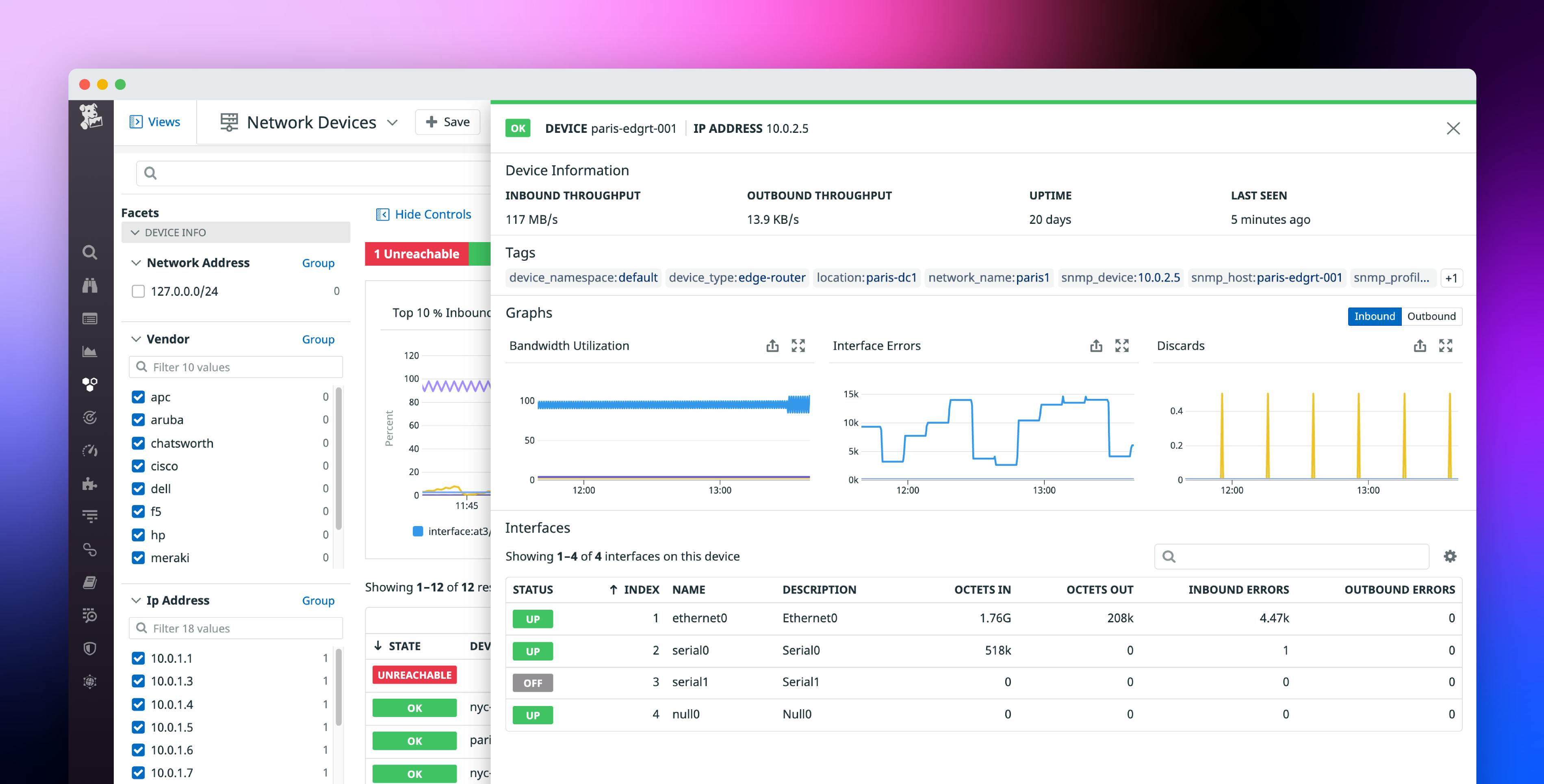
Datadog Network Monitoring provides visibility across cloud, hybrid, and on-premises environments by correlating network traffic with application and infrastructure data. It supports both cloud network monitoring and network device monitoring, enabling teams to analyze traffic flows, monitor connectivity, and investigate performance issues across modern and traditional environments.
Key features include:
- Unified visibility across environments: Monitors cloud-native, hybrid, and on-premises infrastructure, including containers, serverless services, virtual machines, and physical devices.
- Cloud network monitoring: Provides visibility into traffic between microservices and tracks connectivity performance across cloud and on-premises endpoints.
- Network device monitoring: Collects and unifies metrics from physical and virtual network devices, supporting wide area network and hybrid visibility across multiple vendors.
- Traffic path visualization: Displays hop-by-hop traffic paths between applications to identify latency, packet loss, and intermediate hop performance issues.
- NetFlow and infrastructure correlation: Links NetFlow traffic data with underlying infrastructure and application components to support root cause analysis.
- Service-to-service interaction monitoring: Tracks and alerts on network performance metrics between services, pods, clusters, and hosts.

3. Splunk

License: Commercial
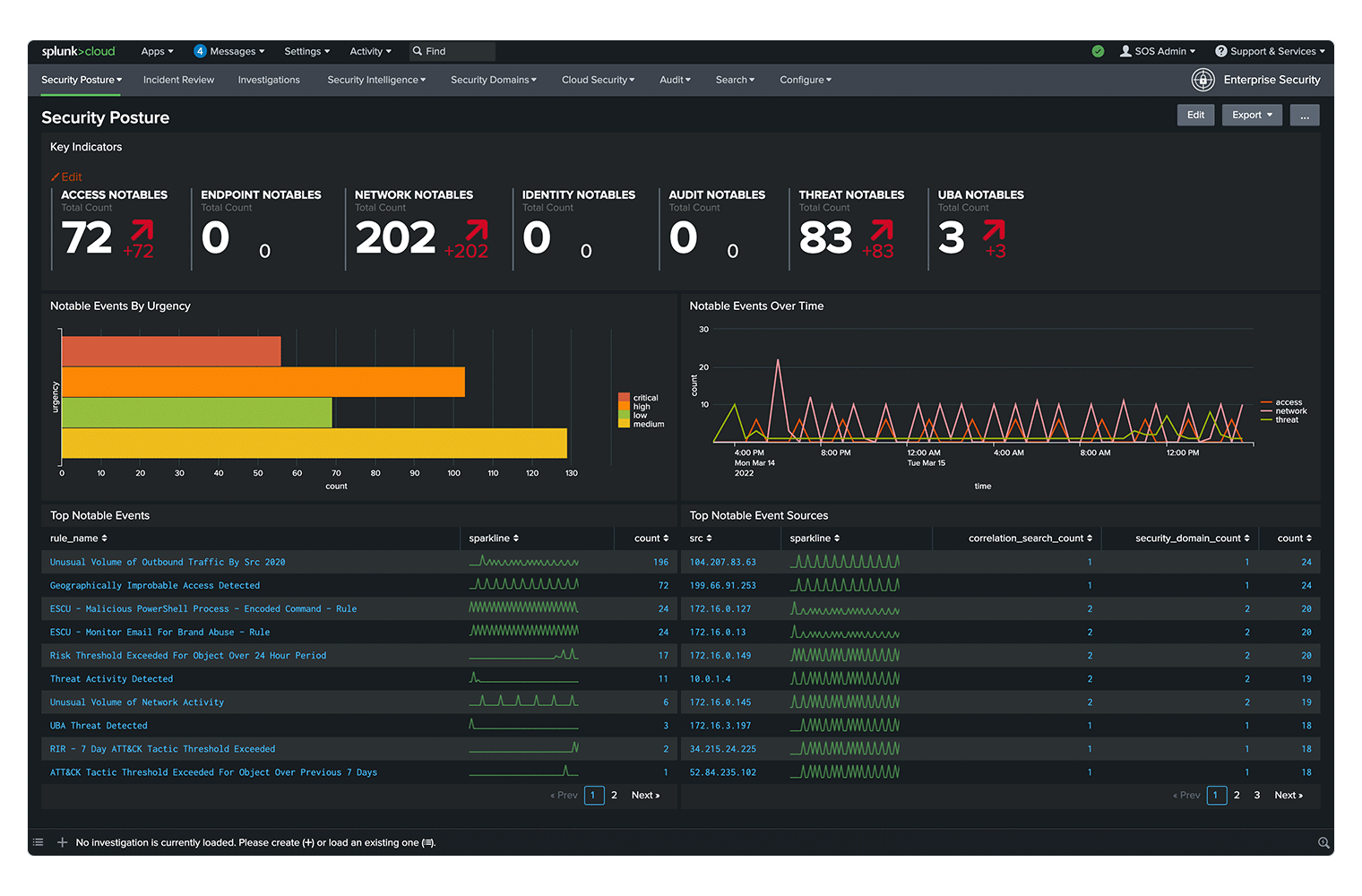
Splunk Enterprise Security is a unified threat detection, investigation, and response (TDIR) platform that combines SIEM, user and entity behavior analytics (UEBA), security orchestration and automation (SOAR), and AI-driven workflows. It centralizes security operations, helping teams detect, investigate, and respond to threats across cloud, on-premises, and hybrid environments.
Key features include:
- Unified TDIR platform: Integrates detection, investigation, and response workflows into a single workspace, reducing tool switching and operational silos.
- Full-spectrum data visibility: Enables teams to search and analyze data across domains, clouds, and devices, regardless of where the data resides.
- User and entity behavior analytics (UEBA): Applies machine learning to detect behavioral anomalies, helping identify insider threats, compromised accounts, and lateral movement.
- Risk-based alerting: Prioritizes alerts based on risk to reduce alert volume and improve true positive rates.
- SOAR integration: Automates security workflows and response actions, reducing manual effort and improving consistency.

Source: Splunk
4. IBM QRadar

License: Commercial
IBM QRadar SIEM centralizes security event visibility and provides real-time threat detection, investigation support, and compliance reporting. It aggregates and correlates data from multiple sources to give security teams a unified view of activity across the environment. The platform is designed to reduce manual analysis, improve detection accuracy, and support faster incident response.
Key features include:
- Centralized security visibility: Collects and correlates data from diverse security tools and data sources to provide a consolidated view of events.
- Real-time threat detection: Identifies threats as they occur, helping teams respond before incidents escalate.
- User behavior analytics (UBA): Detects anomalous user behavior and insider threats by analyzing activity patterns and highlighting risky users.
- Network threat analytics: Monitors network activity to detect advanced attacks across the full attack path.
- Sigma rule support: Integrates with the open source SIGMA community to enhance detection content and coverage.

Source: IBM
5. Wireshark

License: GPL 2.0
Repository: https://github.com/wireshark/wireshark
GitHub stars: 9K
Contributors: 1.2K +
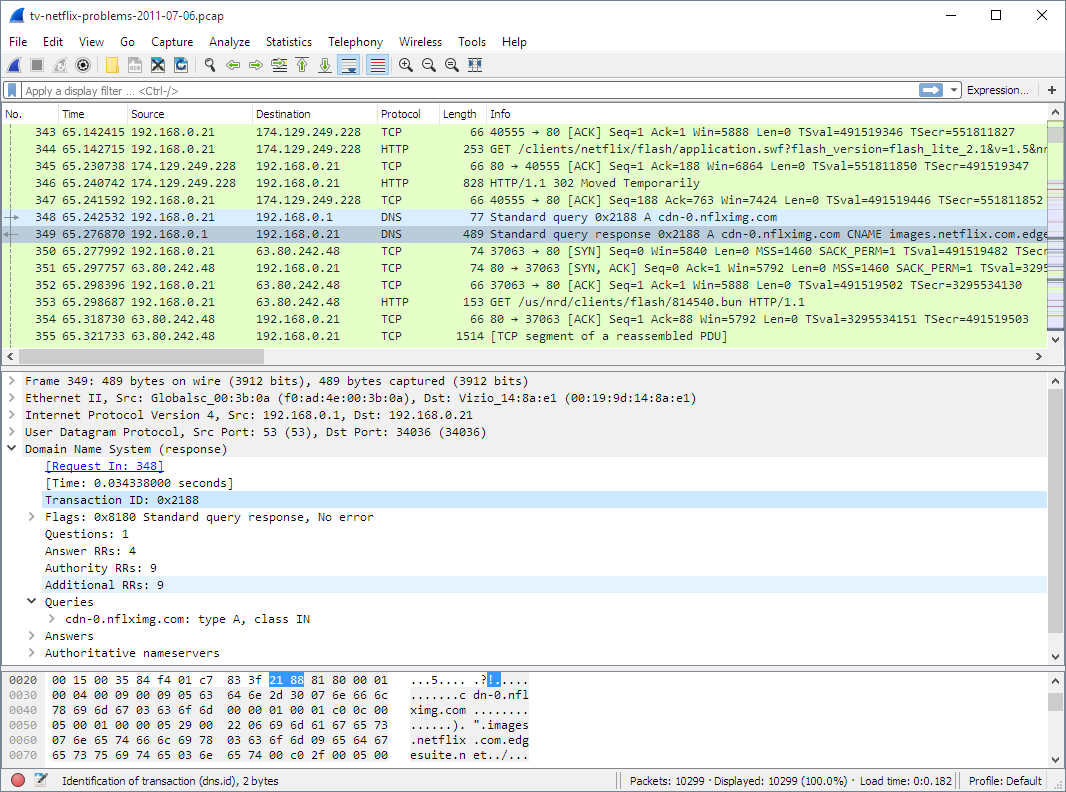
Wireshark is an open-source network protocol analyzer used to capture and interactively inspect network traffic. It enables deep inspection of hundreds of protocols and allows users to analyze live traffic or saved captures for troubleshooting and protocol analysis. The project is distributed under the GNU General Public License and is supported by an active global community.
Key features include:
- Deep protocol inspection: Captures and interactively analyzes traffic across hundreds of network protocols for detailed visibility.
- Live capture and offline analysis: Supports real-time packet capture as well as analysis of previously saved capture files.
- Open-source licensing: Distributed under the GNU General Public License with full access to source code.
- Cross-platform availability: Provides installers and packages for Windows, macOS, Linux, and source-based installations.
- Community-driven development: Maintained and extended by a large community of contributors and users.

6. Nagios Network Analyzer

License: Commercial, based on Nagios Core which is licensed as GPL 2.0
Nagios Network Analyzer provides flow-based traffic monitoring and packet analysis with integrations for tools such as Wireshark, Suricata, and Nmap. It unifies NetFlow, sFlow, J-Flow, and IPFIX data streams to deliver detailed traffic visibility. The platform supports packet capture, rule-based alerting, and network discovery to enhance situational awareness across the network.
Key features include:
- Enhanced flow analysis: Aggregates NetFlow v5, v7, v9, sFlow, J-Flow, and IPFIX data with configurable retention and near real-time updates.
- Packet capture and inspection: Enables real-time packet capture and analysis, including integration with Wireshark and PCAP imports.
- Threat detection with Suricata: Supports live and imported packet inspection using Suricata signature-based scanning.
- Network discovery with Nmap: Performs live or scheduled scans to identify open ports and potential security risks.
- Automated alerting: Triggers alerts based on flow queries, Suricata signature IDs, or Nmap scan results, with email and SNMP notification options.
- Nagios XI integration: Forwards alert data and monitoring results into Nagios XI for centralized visibility and workflow integration.


7. Zabbix Network Monitoring

License: AGPL 3.0
Repository: https://github.com/zabbix/zabbix
GitHub stars: 5K+
Contributors: 30+
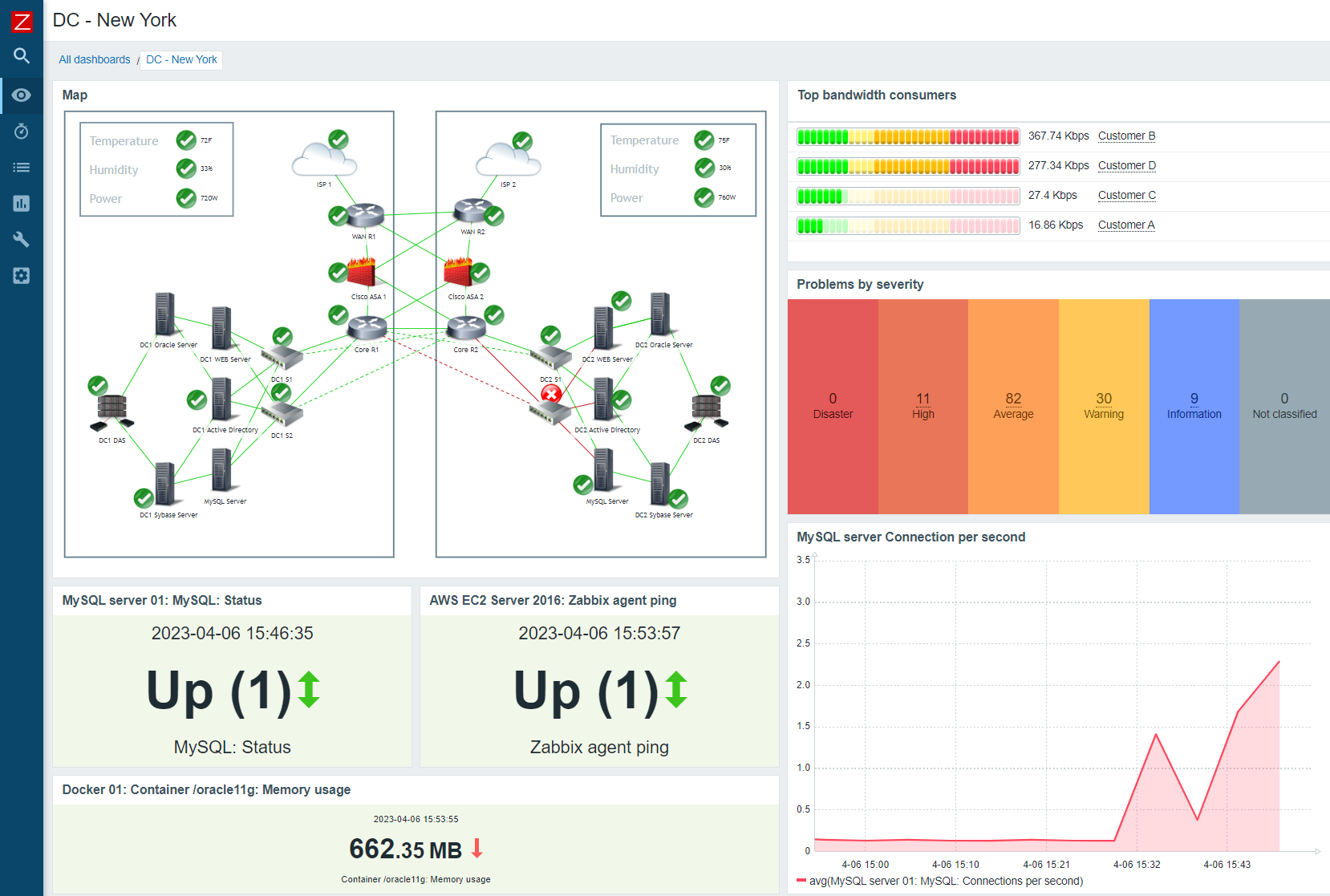
Zabbix Network Monitoring collects, analyzes, and responds to network metrics using SNMP, agents, and trap collection. It supports monitoring of traffic, device health, and interface performance across a range of hardware. Zabbix also includes alerting, anomaly detection, data transformation, aggregation, and automated discovery to maintain network visibility and consistency.
Key features include:
- SNMP-based metric collection: Supports SNMP v1, v2c, and v3, including trap collection, to monitor traffic, bandwidth, packet loss, interface errors, and link status.
- Device health monitoring: Tracks availability, uptime, CPU and memory usage, power supply status, temperature sensors, and fan states.
- Flexible alerting and escalation: Defines thresholds, suppresses alerts during maintenance, supports anomaly detection, and escalates issues across users or departments.
- Data normalization and transformation: Validates metrics, converts counters to per-second values, and extracts structured data from JSON and XML sources.
- Aggregated statistics: Calculates minimum, maximum, average, and total values across time periods for traffic and error metrics.
- Automatic discovery and onboarding: Discovers devices and resources, applies templates, and automatically handles onboarding and offboarding.

8. SolarWinds Network Monitoring

License: Commercial
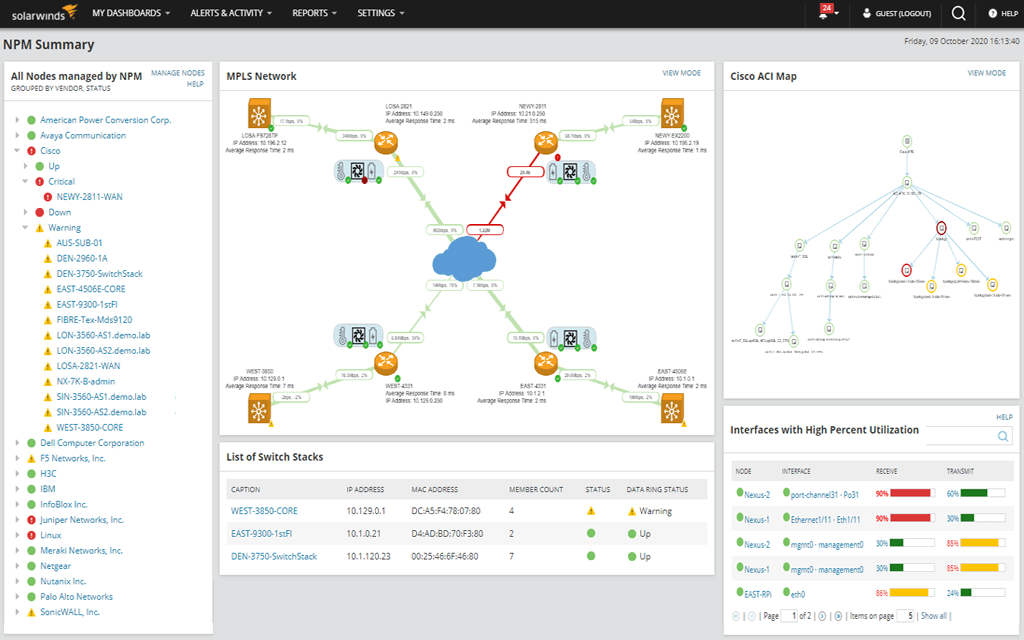
SolarWinds Network Performance Monitor (NPM) provides end-to-end network visibility through automated discovery, topology mapping, and performance analysis. It monitors wired and wireless devices and supports troubleshooting using timeline correlation and hop-by-hop path analysis. The platform includes intelligent alerting based on performance baselines and historical data.
Key features include:
- Automatic device discovery: Identifies devices on the network using built-in scanning capabilities to simplify monitoring setup.
- Topology mapping: Visualizes connections between devices, applications, and links to improve visibility and troubleshooting.
- Application and response time analysis: Breaks down application performance and calculates network response times to isolate issues.
- Timeline correlation with PerfStack: Enables drag-and-drop correlation of multiple performance metrics on a single timeline.
- Hop-by-hop path analysis: Uses NetPath to analyze critical paths across on-premises, cloud, and hybrid environments.
- Baseline-based intelligent alerts: Establishes performance baselines from historical data and triggers alerts on significant deviations.
- Wireless monitoring: Monitors wired and wireless devices, including Wi-Fi maps that update regularly.

9. Site24x7 Network Monitoring

License: Commercial
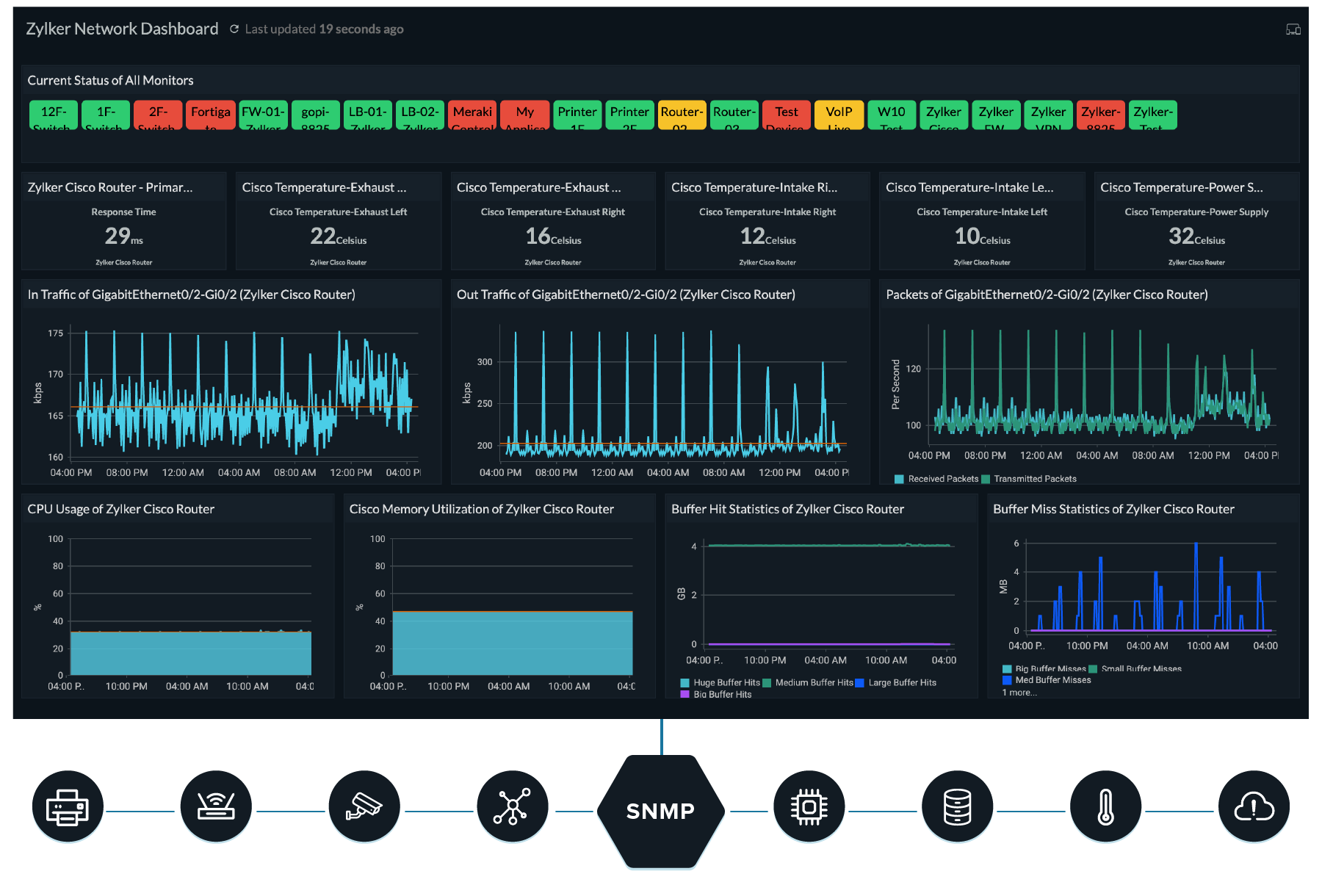
Site24x7 Network Monitoring is a cloud-based monitoring platform that provides visibility into network devices, interfaces, and traffic. It centralizes monitoring through a unified console and supports automated thresholds, alerts, and flow analysis. The solution integrates network monitoring into a broader observability platform covering servers, applications, and cloud resources.
Key features include:
- Automated network discovery and mapping: Detects devices within IP ranges or CIDR blocks and generates topology and Layer 2 maps.
- Performance and interface monitoring: Tracks bandwidth, traffic patterns, latency, packet errors, and interface utilization.
- Flow-based traffic analysis: Supports NetFlow, sFlow, J-Flow, and similar technologies to analyze bandwidth usage patterns.
- SNMP trap processing: Processes SNMP traps for event-driven monitoring and alerting.
- Multi-vendor device support: Supports monitoring across hundreds of device types and templates.
- Custom dashboards: Provides configurable dashboards for high-level overviews and detailed performance analysis.
- Cloud-native deployment: Delivered as a cloud-hosted service with centralized dashboards.

10. PRTG Network Monitor

License: Commercial
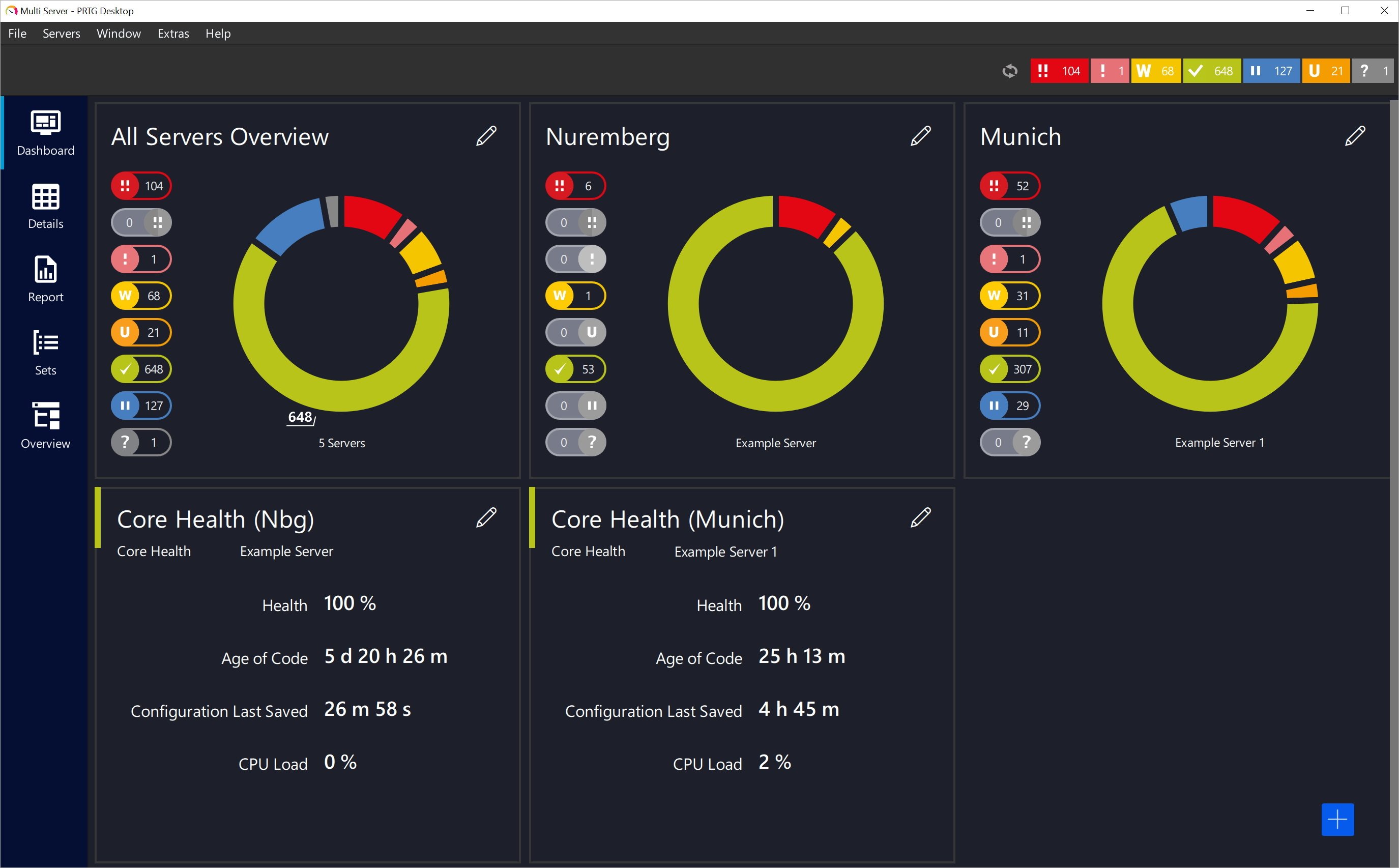
PRTG Network Monitor by Paessler provides monitoring for network devices, bandwidth, servers, applications, and virtual environments. It includes automatic network discovery, preconfigured sensors, and centralized management through a single console. The platform supports multiple data collection methods and provides alerting across various notification channels.
Key features include:
- Automatic network discovery: Scans the network and applies predefined device templates and sensors for rapid setup.
- Preconfigured sensors: Includes built-in sensors for monitoring bandwidth, devices, usage, and vendor-specific hardware.
- Varied data collection methods: Supports SNMP, packet sniffing, and flow-based technologies for usage monitoring.
- Centralized management console: Provides a single interface to monitor devices, servers, applications, and virtual systems.
- Fail-safe monitoring: Offers cluster functionality with a failover node for resilience.
- Customizable alerts and notifications: Sends alerts via email, SMS, push notifications, and other channels when thresholds are exceeded.
- Distributed monitoring: Supports monitoring of remote sites and branch offices.

How to Choose the Right Network Monitoring Tool
Here are some of the main factors to consider when evaluating network monitoring solutions.
Scalability Considerations
As organizations grow, their networks become more complex, requiring tools that can handle increased data volume and network intricacy. A scalable monitoring solution can accommodate additional devices, users, and workloads without sacrificing performance or accuracy.
Selecting a tool with scalability options allows organizations to adapt to changing network demands. Tools that offer horizontal and vertical scaling mechanisms ensure a seamless monitoring experience during network growth.
Integration Capabilities
Modern IT environments often involve diverse technologies and systems. A tool that integrates well with other applications and platforms can provide a comprehensive view of network health and performance. This integration allows for automated workflows and data sharing.
By choosing monitoring tools with strong integration features, organizations can simplify IT operations and reduce manual efforts. Integrated systems enable centralized monitoring and management, offering a unified platform for all network activities.
User Interface and Ease of Use
A network monitoring tool’s user interface (UI) significantly impacts its usability and effectiveness. A well-designed UI enables IT staff to easily navigate the tool, set configurations, and interpret data. Ease of use ensures that teams can quickly respond to issues and make informed decisions based on clear visualizations of network performance.
Choosing a tool with an intuitive interface reduces the learning curve and boosts productivity. User-friendly features, such as drag-and-drop dashboards and automated reporting, improve user adoption and efficiency.
Cost and Licensing Models
Organizations need to consider initial costs, ongoing fees, and the potential for hidden charges. Licensing models vary, including subscription-based, perpetual, or freemium options, each with its own cost implications and benefits depending on the organization’s budget and needs.
Evaluating the total cost of ownership helps organizations balance budget constraints with functionality requirements. Understanding the licensing terms and future scalability costs ensures that the investment supports both current needs and future growth.
Conclusion
Network monitoring tools are essential for maintaining the performance, reliability, and security of modern networks. By selecting a solution that aligns with an organization’s specific needs—considering factors such as scalability, integration, usability, and cost—IT teams can ensure optimal network operations and proactively address issues. Investing in the right monitoring tool not only improves network health but also supports business continuity and operational efficiency.
Learn More About Exabeam
Learn about the Exabeam platform and expand your knowledge of information security with our collection of white papers, podcasts, webinars, and more.
-
 Blog
Blog Five Ways Exabeam Delivers Better Detection and Security Outcomes Than Microsoft Sentinel
- Show More